

分类
标签



Nicolas Kick
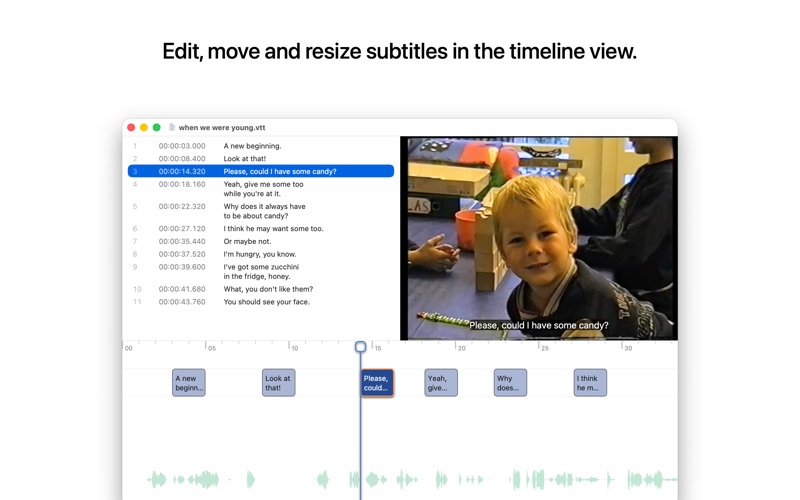
Underword is a visual editor for subtitles in the WebVTT (.vtt) and SubRip (.srt) file formats with audio transcription capabilities. To unlock the full potential of Underword, select a video or audio to show alongside the editor. If you can open the video in QuickTime, you can open it in Underword. Subtitles will be visualized in real time. (The WebVTT format is interpreted differently by various internet browsers and video players. Please visit the website to learn how they are displayed in Underword.) You can start creating subtitles from scratch or by importing text (e.g. from a movie script) that will be divided into manually adjustable subtitles. You can also transcribe the audio of the opened video or audio file: simply download one of the available AI models by Apple or one of the Whisper models, then let your Mac do the transcription offline, without sharing your data. The timeline view allows you to resize and rearrange subtitles with intuitive gestures. The waveform of the selected video or audio file helps you find the start and end of dialogues. Dragged subtitle boundaries automatically snap to the timeline cursor and at a distance of two empty frames to other subtitles. Menu commands with keyboard shortcuts allow you to set the start or end time of the selected subtitle to the current video time, as well as split a subtitle at a given text position, merge several subtitles, and perform find and replace operations. Precisely control all the subtitle settings with manual text input. Toggle bold, italics and underline for the selected text range. (Custom CSS styling is currently not supported.) If you have any requests, suggestions or bug reports, you're welcome to visit the website through the Support link.