

分类
标签



Furtive Technology
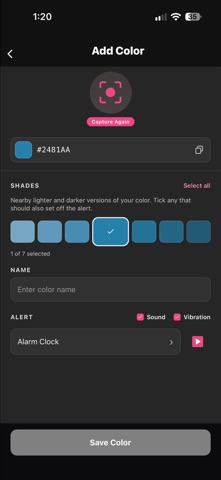
Color Alerts makes it easy to receive alerts when your favorite colors are detected. Use the Capture button at the bottom center of the screen to save the color currently visible within the capture area. Once a color is captured, you can choose the alert or vibrate option you would like to hear or feel whenever the camera detects that color. Your saved colors can be viewed and managed by selecting the Saved Colors icon in the upper-left corner of the screen. From there, you can enable or disable individual colors, allowing you to choose exactly which saved colors you want Color Alerts to monitor. For more accurate color detection, Color Alerts provides several ways to fine-tune what the camera is monitoring. Adjust the zoom above the Capture button, change the size of the capture area using the control on the right side of the screen, or use the Custom Controls panel to fine-tune your color selection and detection settings. Once your color and detection settings are configured, simply position your device where you want it to monitor. When one of your enabled colors appears within the capture area, Color Alerts will notify you with your selected alert.